My Salesforce Exam Experience with Pearson OnVUE
Posted: August 1, 2025 Filed under: Uncategorized | Tags: Certification, education, Exam, OnVue, Salesforce, Trailblazer, Trailhead, WebAssessor Leave a commentWith over 20 Salesforce certifications under my belt, I have a lot of experience with the Salesforce exam experience with WebAssesor. My first exam was in 2013 and over the years I’ve seen a lot of enhancements and changes to the exam experience but none quite as extreme as the July 21st 2025 migration from WebAssesor to Pearson OnVUE.
I took a Salesforce Certification exam from OnVUE the very first week it went live and I am sharing my experience on this new platform to help you prepare.
PREREQUISITES
Now everyone will be required to have a Trailblazer account in order to register for an exam. This is easy to do but you will want to keep the following in mind:
Government Name: When you actually check in you will be expected to show a valid government issued identification that matches the name on your Trailblazer account. Fortunately I go by my given name but if you use a nickname or a different last name you will need to get your Trailblazer account updated first.
Valid Email: To get the confirmation and reminder emails make sure you have a valid email address tied to your Trailblazer account and not one for a previous employer that you cannot access. I did not have one on mine so I had to remember the exam date and log into Trailhead to start the exam.
If you are taking the exam online you will need to have a computer on Windows 10, MacOS 13 or higher. Tablets and phones are not permitted. In addition you need a webcam, micophone and speaker and adequate network speeds.
SALESFORCE EXAM REGISTRATION
The actual experience of signing up for an appointment was relatively straightforward. From Trailhead you first enter your preferred language; the choices currently are English and Japanese. Then the timezone listed in your Trailhead profile will appear, but you can select a different one, and you click on your preferred date.
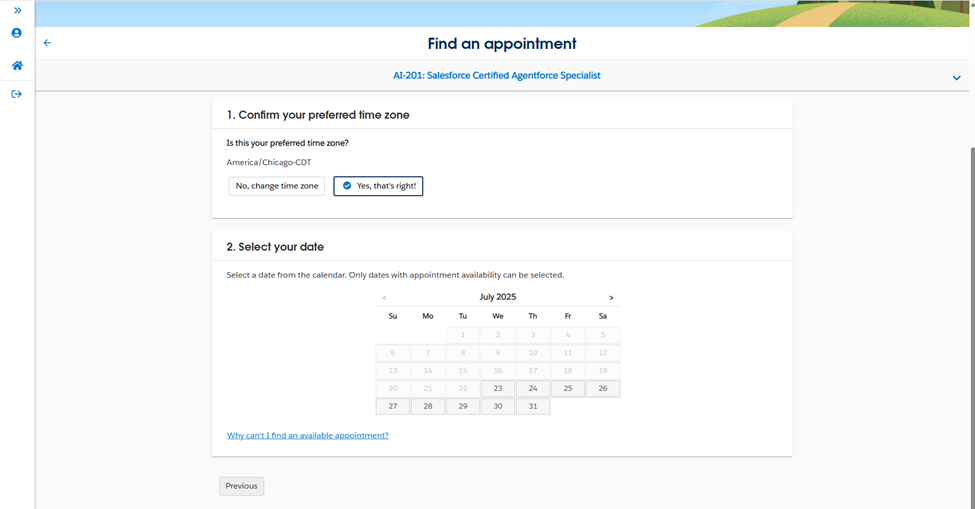
The system will suggest a recommended appointment start time. At first I thought that was the only open time but then I realized there was a button called “Explore more times”. Click that to see all of the available slots for that day.

⚠️An important difference to note is that your appointment time is for when the Exam is scheduled to start but the expectation is that you start the check-in time thirty minute before that time.
CHECK IN AND VERIFICATION
I thought I would be extra prepared and downloaded and ran the OnVue software and Systems Test the night before. You do that by going to https://www.pearsonvue.com/us/en/salesforce/onvue.html and clicking on Run system Test. I felt better knowing it worked but ultimately it did not save me any time on test day as I was required to do it again.

When you arrive thirty minutes early for check-in you will be asked to install and Run the System check which basically locks down your computer for only the test. So make sure you have install permissions on your computer. For this reason work computers usually will not work.
You will be given a QR code to scan on your mobile phone where you will take photos of the front and back of your government issued identification. You will also take photos of your desk from multiple angles–including front and back.
Then you are told to put your mobile phone aside and you will be put in a queue to be checked in by a proctor. This is the worst part. You literally just have to set there staring at a camera view of yourself. Fortunately it does show where you are in the queue. I was 7th in the queue so it took a while before it was finally my turn.
When the proctor came on they had me hold up my laptop so the camera would show every possible part of my desk. They told me to remove my tissue box, then they told me to remove my pen container, then they told me to remove my bobblehead, and on and on it went. The instructions said to “Remove all other items from your desk and at arms’ reach”. I felt the items were well out of arms reach but apparently they were still too close. Lastly, I had to hold up my laptop camera to show that my non-used monitors were unplugged.
I truly do appreciate this thoroughness though, as I work very hard to learn and study for my exams. I applaud any effort to stop people from cheating.
Test Day Recommendations
- It was awkward trying to hold up the laptop to point the camera to show my test area. Next time I will use an external webcam
- Next time I will just take the test at the kitchen table instead of having to literally take everything off my work desk and unplug all my monitors.
- Remind others in your household that you are taking an exam and ask them to be quiet and avoid streaming to ensure you have adequate bandwidth.
THE SALESFORCE EXAM EXPERIENCE
It took the full thirty minutes before I was finally given the greenlight from the Proctor to take the exam. As with WebAssesor, there are some instructions and agreements before the exam appears. When you are ready you can start the actual test.
Once I started the exam the first question appeared right away and I could see the timer countdown in the upper right corner of my screen.
I thought I read that I could zoom in to make the font larger but I could not immediately figure out how to do that and gave up as the font was a decent size already. I had my reading glasses on my head in case I needed them but never did.
💖💖My absolute favorite new feature is the ability to strike out options that I knew were incorrect. It was a bit finicky at times to strikethrough but if you click on the text of the answer it will show the line like this. That really reduced my overall test time as I did not waste time rereading all the options.
As with WebAssessor you could flag records that you wanted to review later. It was quite easy to click the flag button to mark items.
You then have the option to go back and review the items that were flagged. Another nice new functionality is that the start of the question is displayed. So instead of just showing that I had question 2 and 3 flagged, it would show the first 100 or so characters from the question. Even though it is hard to really know the gist of a question from just the first few characters I found this added to my confidence and allowed me to quickly find a question that I wanted to go back to.
Here is an illustrative example of how the Salesforce Review section looks:
| Number | Question | Flagged |
| 1 | Acme corporation wants to… | |
| 2 | What is the best way to… | 🏴 |
| 3 | How would a developer… | 🏴 |
Unfortunately this new tool did not show a count of the number of records that I had flagged the way WebAssessor did. I had to manually try and count them in order to gauge my confidence in passing the exam. For example, if I had 10% flagged then I knew I would be good but if I had 15% flagged then I would want to review them some more.
SALESFORCE EXAM RESULTS
Once you submit the exam you will immediately see if you passed along with your percentage right for each major area.
I am happy to report that I passed the exam.
For me it is stressful taking an exam because the questions are so complex and one accidental glance to the side or unconscious mumbling to yourself can cause the proctor to step in. So after about 15 minutes of decompressing I logged into Trailhead to see if my new certification showed up. The shiny, new certification badge was already there.
Best of luck to you on your certification journey.
######
 crmology